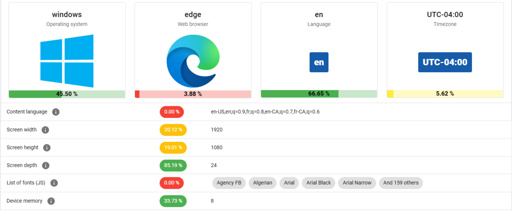
Amidst the glossy marketing for VPN services, it can be tempting to believe that the moment you flick on the VPN connection you can browse the internet with full privacy. Unfortunately this is quite far from the truth, as interacting with internet services like websites leaves a significant fingerprint. In a study by [RTINGS.com] this browser fingerprinting was investigated in detail, showing just how easy it is to uniquely identify a visitor across the 83 laptops used in the study.
As summarized in the related video (also embedded below), the start of the study involved the Am I Unique? website which provides you with an overview of your browser fingerprint. With over 4.5 million fingerprints in their database as of writing, even using Edge on Windows 10 marks you as unique, which is telling.
here is a fingerprinting test you can trust https://coveryourtracks.eff.org/
fingerprinting is nasty, i suggest canvas blocker extension because it gives them fake readouts
If the NSA wants you, they will get you. But I can hide from most of you with just a little email relay and a VPN
The only real advantage you gain is being able to watch things outside your region. Without lots of work, you’re pretty easily traceable on the modern internet.
I remember in 1996 my neighbor was in one of these fancy new things on the internet called a “chat room”.
He got into an arguement with someone. It got heated. Until the other guy threatened to show up at my neighbors house.
My neighbor scoffed and laughed.
Then the guy put in my neighbors real address. To this day, that still scares me. And back then internet crime wasn’t taken seriously. In fact doxxing back then may not yet have even been a crime.
Does anyone know if Firefox’s claimed Anti fingerprinting technology is any good?
it’s useless. test it out with creepjs
I bought a used laptop from a yard sale and only use public Wi-Fi and never use the laptop for anything with my name on it.
Pfft amateur, I break into my local Applbee’s after 2AM and use their POS terminal browser to look at used cars.
Applebee’s at 2AM which leaves a physical trail? Noob. I strap meshtastic nodes on wild dogs, using them as a Internet relay at 1-2kb a second, to look at manga leaks.
Librewolf + uBlock Origin + Privacy Badger + containerise
For the comedy extra point, a user agent switcher can actively lie about your browser & OS.
Using a browser like Librewolf is, itself a unique identifier bc not enough people are using it.
EFF has a tool that lets you check your “uniqueness” and bc I used a lesser known browser, it was easier to track me.
Not that I mean you shouldn’t use it. I just wanted to clarify that it doesn’t make you safe from ads. :(
https://coveryourtracks.eff.org/ is the EFF tool.
My results say that I have strong protections against tracking, and that my browser is unique. It’s as good as I can get.
The agent switcher also tells the world my Librewolf on Linux is Chrome on Windows.
Isn’t it a bad thing to be unique in this context? If my browser is 1 in a million, that means that a tracker can pick me out of a lineup of a million users, no? That’s why a captcha can verify you as human simply by checking a box, because it can identify your unique browser as associated with human activity.
If I’m not mistaken, we want the opposite. We want our browsers to be as generic as possible if we don’t want to be tracked.
Good luck I’m behind 7 proxies
I’m here with multi-hop VPN with the first two hops staying in-country and the rest all random + a shit load of DNS blocking lists and browser extensions + blocking Google. I use different VPN providers too. I’m also introducing variable delays to my traffic to make NetFilter data less helpful.
Please understand that browser extensions make you more easy to track. I used to be under the same assumption, but uBO is as far as you should go. fingerprints include your extensions.
It’s always kind of funny when the Technology folks wade into well-researched and well-worn Privacy territory.
Do you want to not wave a giant flag of your activity to Google, Meta, MS, and your ISP when you do literally anything online? Either use a VPN and Mullvad (or Librewolf, but YMMV) browser, OR a VPN and Tor OR Tor with an https bridge if paying for a VPN will make you a target (Tor bridges are not for casuals, save them for those in genuine need).
VPN locations need to be changed. Frequently. Router level VPN at home becomes your “This is me” location, then make use of VPNs on each device when you want an extra layer of obfuscation.
There’s not a lot of middle ground at this point, and it’s not difficult.
Does that mean my ISP can still detect if I’m going to websites they don’t approve of if I’m using Mullvad as my VPN but using Firefox as my browser?
Your ISP can’t tell who you are contacting if you are using a VPN, but websites will track you by other means.
No, with a VPN the only thing your ISP sees is you connecting to a VPN server IP.
But browser finger printing, on the other hand, can identify you to every website you visit, due to info your browser hands over to every website… Such as OS version, Resolution, installed Plugins, browser settings, geolocation info, etc…which is often unique enough to identify you out of the whole of the internet.
Ironically, locking your browser down with more security features/settings/plugins often makes you more identifiable. Cause capitalism is god damned sure they are gonna track you and monetize the hell out of your information, whether its via your name, your user name, or just your digital fingerprint.
This is why you use a separate browser for different activities and don’t cross contaminate.